The Invisible Server: Zero-Cost Domain Redirects with AWS

At sevenseven.tech, we hate waste. We hate wasted CPU cycles, wasted money, and most of all, wasted maintenance time.
One of the most common requirements in web infrastructure is the Domain Redirect.
- You need www.sevenseven.tech to forward to sevenseven.tech (Canonicalization).
- You bought old-brand.com and need it to point to new-brand.io.
The Old Way: Spin up a small Nginx server or a Docker container. Configure a reverse proxy. Install Certbot for SSL. Set up a cron job to renew the certificate. Patch the OS every month.
The SevenSeven Way: An empty S3 bucket and a CloudFront distribution. No servers, no patching, and it costs virtually nothing.
The Architecture: The "Empty" Bucket
This solution is clever because it utilizes a specific feature of Amazon S3 Static Website Hosting: The "Redirect requests" option.
We don't put any files in the bucket. The bucket is empty. Instead, we tell S3: "If anyone knocks on this door, don't look for a file. Just send them to this other address."
We then front this bucket with CloudFront to handle the HTTPS connection (since S3 website endpoints don't support HTTPS natively).
Here are the two most powerful use cases for this setup.
Use Case 1: The SEO Polish (www to non-www)
Search engines view www.example.com and example.com as two different websites. To avoid "duplicate content" penalties and split traffic, you must pick one and redirect the other.
- We created a bucket named www.sevenseven.tech.
- In Static Website Hosting, we select "Redirect requests for an object".
- We set the target bucket/domain to sevenseven.tech.
- We attach CloudFront with a free ACM certificate to handle the secure https://www.sevenseven.tech request.
The Result: A 301 Moved Permanently response that is lightning fast, globally distributed, and requires zero code.
Use Case 2: The Acquisition (Cross-Domain)
Imagine you own mydomain-one.com, but you just rebranded to mydomain-two.org. You need to catch all that old traffic.
You don't need a hosting plan for the old domain. We simply configure the S3 redirect rule on the old domain's bucket to point to mydomain-two.org.
The Magic of Path Pass-Through: S3 is smart. If a user visits mydomain-one.com/blog/article-1, S3 automatically appends that path to the destination. The user lands seamlessly on mydomain-two.org/blog/article-1. The user experience is uninterrupted, and your SEO "link juice" is preserved.
Why this beats a Reverse Proxy (Nginx/Apache)
We see many clients running EC2 instances just to handle redirects. Here is why you should kill those servers:
1. Zero Maintenance
There is no operating system. There is no Apache or Nginx config to tweak. There is no Let's Encrypt bot to break. Once you deploy this stack (via Terraform, naturally), it will run forever without you touching it.
2. Global Performance
If you use a single Nginx server in New York, a user in Tokyo has to wait for the signal to travel halfway across the world just to be told "Go somewhere else." With CloudFront, the redirect happens at the Edge location nearest to the user. It is instant.
3. The Cost: Effectively Free
An empty S3 bucket costs $0.00. CloudFront offers a generous free tier. Even at scale, serving a few million headers (redirects) costs pennies. Compared to the 10 - 20/month minimum for a managed load balancer or VPS.
Architecture Diagram
Visualizing the "Invisible Server."
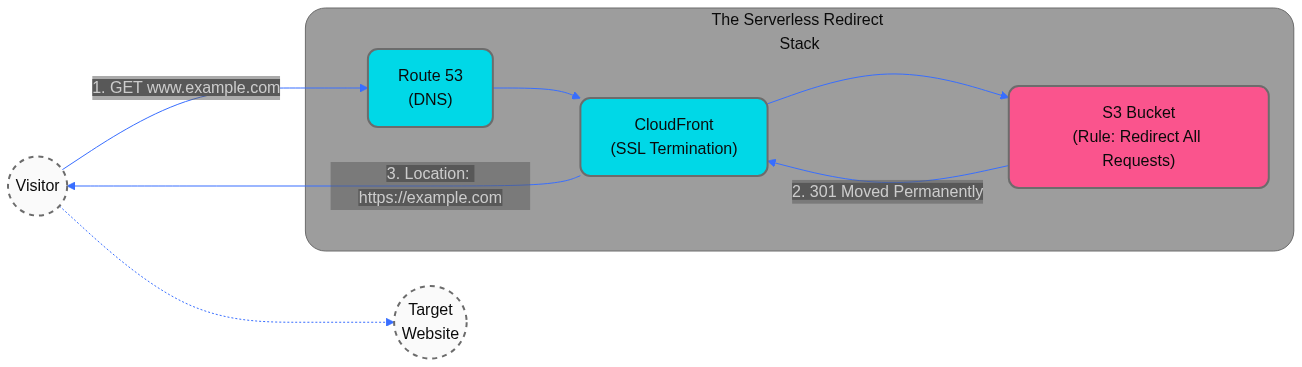 Figure 1: The Serverless Redirect. The user hits CloudFront, which checks the S3 rule and immediately returns a 301 Redirect to the new destination.
Conclusion: Elegance is Efficiency
You don't always need a hammer to crack a nut. For domain redirects, you don't need a server; you just need a rule.
This setup is secure, instant, and practically free. It’s a small detail, but getting the small details right is what separates good infrastructure from great infrastructure.
Need to optimize your cloud?
From simple redirects to complex IoT clusters, we build infrastructure that makes sense. Contact us at support@sevenseven.tech or fill out our contact form.